
Rocket Rumble Discord and Group
Where Headshot Games posts codes, group rewards, and Season 2 news — plus how to verify them in-game.
Rocket Rumble’s official social layer is small on purpose. The experience bio carries one Discord invite. The description tells you to join the community for group rewards. That is the whole official stack: Discord plus the Headshot Games Roblox group. This page is the join order, the codes habit, and the checks that stop a fake server from wasting your Coins.
The game itself is the Roblox experience. If a stranger DMs a different invite and calls it “the real Headshot server,” compare it with the bio before you click. Other destinations sit on the links hub. There is no public Trello.
Join Discord from the bio, not from a comment
- Open Rocket Rumble on Roblox.
- Use the Discord link in the game bio, or the invite this wiki mirrors: discord.gg/qfkyQBzRx.
- Complete whatever verification the server asks for. Staff will not DM you first asking for a password or a Roblox cookie.
- Mute noisy channels if you only care about codes and patch posts. Stay in the server so you still receive announcements.
Developers post codes on Discord. Press has described a dedicated codes channel; look for a staff-labelled codes post rather than memorising a channel slug that might be renamed. After you copy a string, redeem it in the lobby — Discord does not grant Coins by itself.
Codes habit that actually works
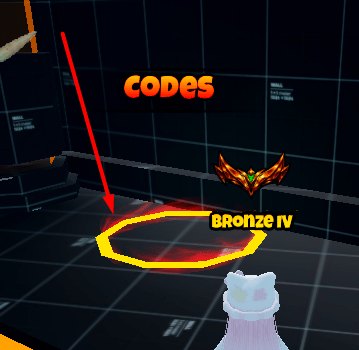
The lobby pad is the only redeemer that matters. Walk onto it, type the string exactly, and read the response.
- Current strings this wiki lists: Bonus_Code, discord, and Release.
- They are case-sensitive.
RELEASEis not the same asRelease. - If the pad says the code is invalid or already claimed, stop repeating it.
- Keep the live mirror on codes so you are not relying on a week-old screenshot.
A good loop after any Season 2 or universe bump: open Discord, copy the newest staff code post, redeem on the pad, then play. Do not stand in a 1v1 spawn typing codes. The patch notes checklist puts this step first for a reason — codes expire even when splash damage does not change.
Join the Roblox group for rewards
- Open the Headshot Games Roblox group and join while logged into the account you play on.
- Launch Rocket Rumble. Look for a group-reward prompt, a lobby grant, or an extra claim button.
- If nothing appears, rejoin the experience once. Roblox group perks often attach on session start, not mid-match.
- Do not pay a middleman who claims they can “apply group rewards” for you.
The official description promises group rewards. This wiki will not invent the item list. If the live client shows a crate, a Coin bundle, or a cosmetic after you join, that is the reward. If it shows nothing, you are either on the wrong account or the grant is currently inactive — both are in-game facts, not Discord rumours.
What to watch during Season 2
Season 2 was advertised around 6–7 June 2026 with new maps and duels [1V1]. A Korean listing also mentioned a new battle pass. Discord is where staff will say that a track ended, a queue moved, or a code dropped for the event. You still verify in the lobby:
- 1v1 button present or missing — then read duels.
- Map rotation changed — then walk it with maps.
- Pass panel present or missing — then read Season 2 instead of inventing a track name.
The universe update on 24 August 2026 is a later stamp. It may or may not have rewritten Season 2. Discord plus the lobby decide; a random boost graphic does not. Returning players should also skim getting started so they are not hunting a pass while standing on the wrong lobby pad.
Safety, ranks, and what Discord is not
Discord is not a second inventory. It will not rocket-jump for you, rank your gloves, or replace the tier list. Use it for:
- Staff code posts.
- Announcements that a queue or map rotation changed.
- Pointers back to the Roblox group and the live experience.
Ignore:
- “Free admin” links.
- People asking you to log in on a lookalike site.
- Unofficial Trello screenshots. Headshot Games has not published a Trello this wiki can cite.
- Patch numbers with no staff post behind them. Use patch notes as a checklist, not as a fake version bible.
If you play on a shared PC, keep Discord logged into a personal account and Roblox on the account that owns the group join. Mixing those two is the usual reason group rewards “do not work.”
Suggested join order for a new account
- Join the Roblox group.
- Join Discord from the bio.
- Launch the game, claim group rewards if they appear, then redeem codes.
- Play one FFA to learn splash, then one duel if Season 2’s 1v1 queue is still up.
- Only then open crates against the tier list.
That order keeps official grants and codes in front of cosmetic spending. Bookmark the links hub if you ever lose the invite. The Discord and the group are how Headshot Games talks to players; the lobby is how you prove those messages are still true. When a staff post, the Roblox events tab, and the client disagree, trust the client you just spawned in, screenshot it, and treat Discord as the place you learned to look — not as a second physics engine.
Frequently Asked Questions
Quick answers for Rocket Rumble players.
What is the official Rocket Rumble Discord?
The invite in the game bio is [discord.gg/qfkyQBzRx](https://discord.gg/qfkyQBzRx). Do not trust a different link from a random comment.
Do developers post codes on Discord?
Yes. Redeem **Bonus_Code**, **discord**, and **Release** on the lobby pad and keep the live list on codes. Codes are case-sensitive.
How do I claim group rewards?
Join the [Headshot Games Roblox group](https://www.roblox.com/communities/997687967) on the account you play on, then load the game and rejoin once if nothing appears.
Is there an official Trello?
No. There is no public Trello. Use Discord, the Roblox events tab, and patch notes to verify changes.
Can Discord tell me if Season 2 is still live?
I am new. What do I do after joining Discord?
Claim codes, follow getting started, then pick FFA or duels. Spend Coins with the tier list last.