
How to Redeem Rocket Rumble Codes
Find the hexagonal CODES pad, type the exact string, and press the green CLAIM button without fighting the case rules.
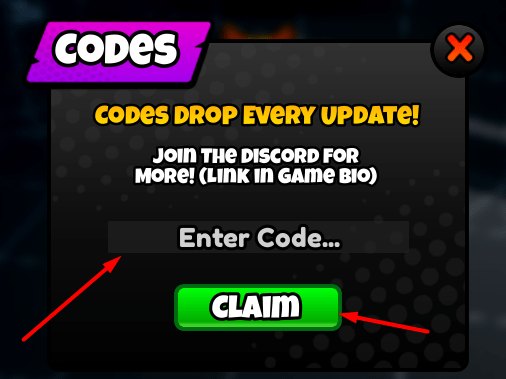
Redeeming a Rocket Rumble code is a lobby action, not a mid-match command. You never type a gift string into chat during a free-for-all, and you never enter it on the Roblox website. Headshot Games put a dedicated hexagonal pad in the social hub, labeled CODES in clear letters, with a rank badge nearby. Screenshots of that corner show Bronze IV; that is the only rank name this wiki will repeat. The pad opens a small claim UI with a reminder, a text field, and a green button. Follow the order below once per account and you will not burn a live string on a typo.
If you still need the live list, keep the codes hub open in another tab. Dead strings, including all-caps RELEASE, live on expired codes. New players who have not even launched a rocket yet should skim getting started and how to play so the Coin gift has somewhere useful to go.
Join the right place first
Open Rocket Rumble on Roblox. The experience is free to play on PC, mobile, and console, uses R6 avatars, and loads you into a lobby before any six-player deathmatch. Wait until the hub finishes streaming. If you click Play and immediately get thrown into an arena, finish or leave that match; the pad is not on the colourful tiled combat maps.
The lobby is a small social floor, not a second playlist. Look for the spin wheel, the leaderboards, and the hexagonal CODES pad. The cowboy-hat promo character from thumbnails is not a required NPC. You are hunting a floor panel, not a hidden vendor. Console and mobile players use the same pad; only the pointer changes (mouse, thumb, or stick cursor).
Open the claim UI
Stand on or activate the hexagonal pad. The panel copy is official and worth reading every time: CODES DROP EVERY UPDATE! JOIN THE DISCORD FOR MORE! (LINK IN GAME BIO). That sentence is why this wiki also maintains a Discord page and a links hub. The invite from the game bio is Rocket Rumble Discord. The studio group is the Headshot Games community.
Under the reminder you get a field whose placeholder is Enter Code… and a green CLAIM button. There is no second confirm. Whatever you submit is what the server checks.
Type the three live strings exactly
Rechecked 7 September 2026:
- Bonus_Code — 2,500 Coins. Capital B, capital C, underscore in the middle. Spaces will fail.
- discord — 1x Double Coins Boost plus 1,500 Coins. All lowercase. Discord with a capital D is a different string.
- Release — Double Coins Boost plus 1,500 Coins. Capital R, remaining letters lowercase. All-caps RELEASE is the retired sibling.
Paste from this page if your device keyboard fights underscores. Do not add quotes, spaces, or punctuation. Press CLAIM after each string, wait for the response, then clear the field for the next one. You can claim all three on the same visit.
Read the two failure messages
The game does not invent a unique toast for every mistake. Two phrases cover almost every miss:
- Code Does Not Exist — the server does not recognize that exact spelling. Check case, then check expired codes. Random YouTube overlays and all-caps RELEASE land here.
- Already Claimed — the string is valid for someone, but this account already received it. You cannot farm the same code twice. Move on.
If CLAIM does nothing, you are not focused on the field, you are in a match, or the pad UI closed because you walked off. Re-open it. Do not mash the button hoping a dead code revives.
What to do after a successful claim
Coins land on the account immediately. Boosts increase Coin earnings per match; they do not change splash radius, rocket speed, or ranked badge art. Spend Coins on crates, skins, and gloves when you are ready, but this wiki will not invent those item names. Use crates, gloves, the parent tier list, and loadouts as those pages fill with real drops. Challenge-based unlocks still require play. A code is a bank deposit, not a skip ticket.
If your goal is a stack of Coins rather than a one-time dump, run the farm coins loop with a Double Coins Boost active. Short six-player free-for-alls on the tiled arenas pay faster than idling in the lobby. For mechanical improvement after you cash in, use controls, rocket jump, maps, and sensitivity settings. Season 2 added 1v1 duels, new maps, and a battle pass around the June 2026 announcement window; redeeming still happens in the lobby, not inside a duel. See duels, Season 2, and patch notes so you do not look for a codes chest on a duel island that does not exist.
Skip circulating combat GUIs. Hitbox extenders, ESP, and trajectory predictors are documented on the scripts hub and combat scripts pages so you can recognize them, not so you can inject them. Codes are the intended shortcut. Injectors are how accounts disappear. The how to use scripts page exists as a warning, not a tutorial payload.
When the next universe update ships, return to the pad first, then this page. Headshot Games last touched the universe on 24 August 2026. The pad copy still promises a drop every update. Claim early; strings do not last forever, and mixed-case Release already has a dead all-caps twin to prove it.
Frequently Asked Questions
Quick answers for Rocket Rumble players.
Can I redeem codes during a match?
No. Leave the six-player free-for-all or duel, return to the lobby, and use the hexagonal CODES pad. Chat is not a redeem channel.
What does the green CLAIM button do?
It submits whatever is in the Enter Code... field. There is no extra confirm. Wrong case still spends the attempt and can return Code Does Not Exist.
Why did Bonus_Code fail when I typed bonus code?
The live string is Bonus_Code with an underscore and two capitals. Spaces and lowercase letters are a different value. Copy it from the codes hub table.
Do I need Discord to redeem?
No. Discord is how Headshot Games announces extra drops. The invite is in the game bio and on the Discord wiki page. Claiming still happens on the pad.
Will a code unlock gloves or crates directly?
The live rewards are Coins and Double Coins Boosts. You then buy crates, skins, or gloves yourself. Challenge-based unlocks still need matches.
Does mobile use a different pad?
No. PC, mobile, and console share the lobby pad. Only the pointer changes. After claiming, tune touch aim on sensitivity settings.