
Rocket Rumble Gloves Guide
How gloves equip, how yellow hands look in first person, and how to test a pair.
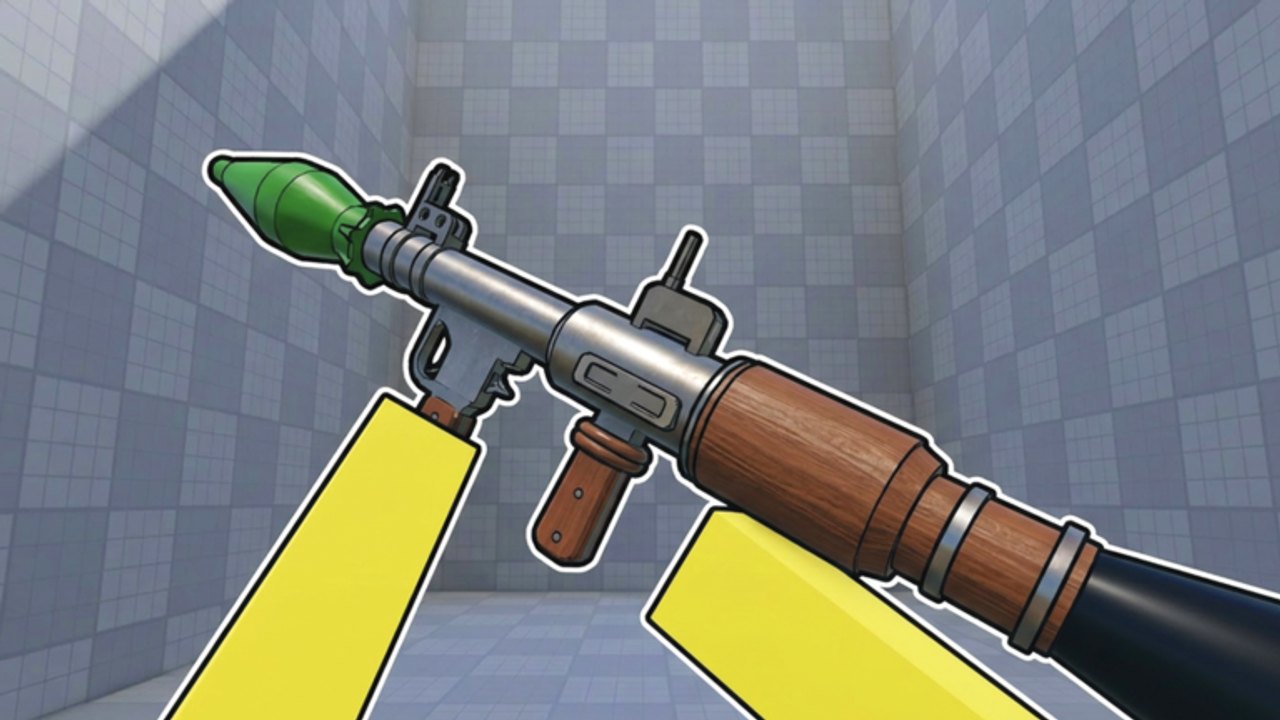
Gloves in Rocket Rumble are the first-person hands you play the entire match through. They are not a second weapon. Headshot Games shipped a rocket-only Roblox FPS on 31 March 2026, so the launcher stays a launcher — screenshots show a green warhead — and the glove slot is how you change what sits around that rocket. This page is the how it works guide: what gloves are, how to equip them, how they look in first person, and how to test a new pair. It is not a ranking. For movement versus cosmetic categories, use the gloves tier list.
Default cameras show yellow blocky hands. That is the baseline you should memorize. New gloves either keep a readable silhouette, add a movement feel, or just recolor the lobby. Until you can tell those three apart from the first-person view, do not spend Coins.
If you just spawned, redeem working codes and follow getting started before you touch the shop. Gloves are easier to judge after you have died to splash a few times.
What the glove slot actually does
A glove pair occupies the hands you see when you look down, jump, slide, and fire. In a six-player Free For All that camera is busy: other rockets, colourful tiles, your own splash. Hands that disappear into the map make the green warhead harder to place. Hands that stay bright make tracking easier even if they are still the default yellow kit.
Some glove categories change movement. You feel it in jump height, slide distance, or aerial recovery. This guide will not name those rows, because the live catalog changes with Season 2 maps, duels, and the battle pass. If a pair changes movement, you will feel it on the same ledge you always jump. Confirm it. Then go to the gloves tier list to see where that category sits.
Other pairs are cosmetic skins. They can still matter if they change contrast. They do not matter if they only look expensive next to the Bronze IV badge in the lobby.
How to equip gloves
Equip in the lobby, not mid-match.
- Leave the queue so you are standing in the lobby with your rank badge visible.
- Open the loadout or inventory slot that shows gloves. The exact label can change; look for the hands, not a gun wall.
- Select a pair you already own. Challenge unlocks, Headshot Games group rewards, crates, and the battle-pass track can all grant pairs. We will not invent the button names.
- Confirm first person, not only the lobby mannequin. Look down. You should see blocky hands around the launcher.
- Fire a practice rocket if the lobby allows it, or queue a short FFA and look down again after the first jump.
- If the hands vanish, the warhead is covered, or the pair did not apply, unequip and try again before you buy a replacement.
If Coins are involved, read how to farm Coins and the crates tier list first. A Double Coins Boost should never be spent on a pair you have not previewed on your own camera.
How gloves look in first person
The important view is not the shop poster. It is the airborne frame where you jump, the launcher kicks, and splash lights the tiles.
Default yellow. High contrast on most colourful arenas. Easy to teach yourself rocket jump timing because you can see where the hands go.
Brighter or cleaner cosmetics. Can help if they keep the same blocky read and do not cover the green warhead.
Dark or busy cosmetics. Often worse in first person even when they look rare in the lobby. If you lose the rocket in the glove art, you will miss peeks in duels and mis-time rocket jumps.
Stand in a bright corner and a darker indoor pocket before you judge a pair. Season 2 added maps; lighting is not identical on every tiled floor. The maps page is for arena reads. This page is for whether your hands survive those reads.
Challenges, group rewards, and crates
Gloves do not only come from the shop.
Challenge-based unlocks grant pairs for playing. Do the challenges that match how you already queue — FFA or Season 2 duels — instead of forcing a mode you hate for a cosmetic.
Joining the Headshot Games group can add a reward track. Claim it. Group gloves are still gloves; equip them and look down the same way.
Crates convert Coins into random outputs that may include gloves or skins. That is an economy problem, not an equip problem. Rank the crate on the crates page, then come back here to put the output on your hands.
Testing a pair in a real match
Queue with the new gloves and run a short script.
Jump the same ledge three times. If height changed, you found a movement category. Slide the same corridor. If distance or recovery changed, same story. Fire while airborne and watch whether you can still see the warhead. Die on purpose to splash once so you see the respawn camera; some cosmetics only look loud on death.
Then play your real mode. FFA with six players stresses tracking in a crowd. Duels stress a clean peek. Best loadouts turns that test into a kit. This guide stops at the test.
If shots feel late after a swap, the gloves may not be the cause. Run the sensitivity tool before you unequip a pair that was actually fine.
What this guide will not do
It will not publish a named glove database. It will not copy the tier list. It will not invent ranks above Bronze IV or map-specific legendary hands. When Season 2 adds a new slot, the equip ritual stays the same: lobby, first-person look down, jump test, then decide whether the pair is movement, contrast, or fashion.
Catalog arguments can go to the Headshot Games Discord. Equip questions stay on this page.
Equip-before-queue ritual
Make this a habit so you stop discovering a broken camera in the opening rumble.
Lobby first: read the Bronze IV badge, open the glove slot, and apply the pair you actually intend to use. Look down until you see blocky hands on the launcher. Check that the green warhead is still the center of the view, not buried in glove art. If the pair came from a crate or a challenge, remember whether it felt like a jump change; if you are unsure, jump in the first match before you fight. If the hands fail the look-down test, unequip to default yellow and queue anyway — readable defaults beat a cosmetic you cannot see.
That ritual is the whole gloves guide. Rank the pair later. Survive the first rocket now.
Frequently Asked Questions
Quick answers for Rocket Rumble players.
How do I equip gloves in Rocket Rumble?
Do it in the lobby. Open the glove or loadout slot, select a pair you own, then look down in first person to confirm the hands on the launcher before you queue.
Why do my gloves look yellow?
The default first-person hands are yellow and blocky. That is the baseline kit, not a bug. New pairs should still be judged in that camera, not only in the lobby preview.
Is this the gloves tier list?
No. This page is how gloves work and how to equip them. Rankings of movement versus cosmetic categories live on the gloves tier list.
Can I get gloves without opening crates?
Yes. Challenge-based unlocks and Headshot Games group rewards can grant pairs. Claim those before you spend Coins. Crate value is covered on the crates tier list.
Do gloves change in Season 2 duels?
The slot is the same. Duels just punish noisy first-person art and panic shots more than a six-player FFA. Test peeks after you equip, and read duels for the mode.
What if a new pair makes my aim feel worse?
Look down: if the warhead is covered, unequip. If the hands are fine, check the sensitivity tool before you buy a replacement.