
Rocket Rumble Mobile Guide
Touch HUD, tap-to-shoot, and how a phone rumble differs from mouse aim on PC.
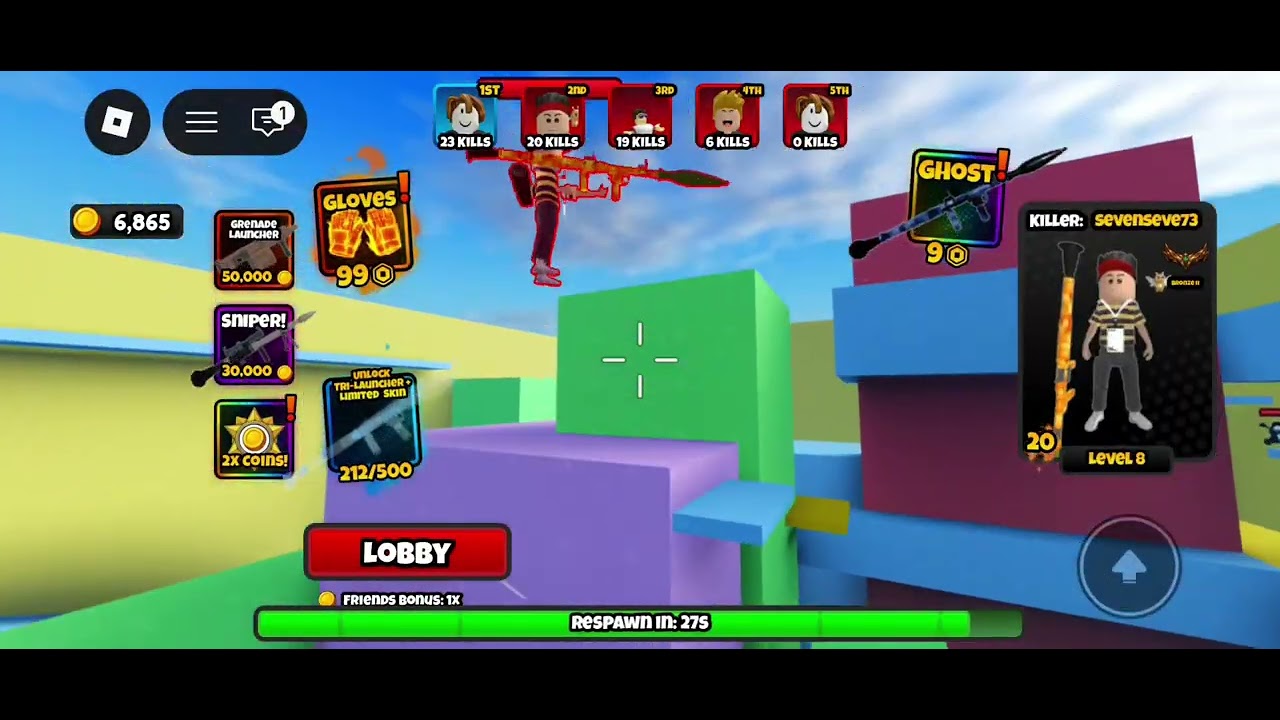
Rocket Rumble on a phone is the same rocket-only Roblox FPS Headshot Games launched on 31 March 2026. You still fight in first person. You still cap at six players. You still queue Free For All or Season 2 1v1 duels. What changes is the HUD under your thumbs. This page is the mobile overlay seen in a real match screenshot, plus how tap-to-shoot differs from a mouse. It is not a second control scheme this wiki invented, and it is not a list of extra buttons we cannot see.
If you have never queued, read getting started and how to play first. PC binds stay on controls. Sensitivity testing for every platform sits on the sensitivity tool. Stay here when the stick, the fire cluster, or the match chrome is the problem.
What the mobile HUD actually shows
A real mobile screenshot of a match shows a compact overlay. Memorize it before you blame the rocket.
Virtual stick. Movement lives on a touch stick. Place the thumb so a small drag is a strafe and a large drag is a turn into space, not a spin into your own splash. If the stick sits on top of the look area, you will fire while trying to peek.
Fire buttons. Tap-to-shoot is the combat input. Keep the fire cluster reachable without covering the camera drag. A thumb that fights the look thumb will splash the wall you are hugging. That is a layout problem, not a missing rifle.
HP 100/100 bar. Health is shown as 100 over 100 on that HUD. Treat 100 as full. Your own rockets still hurt you. If the bar dumps after a shot at your feet, that was self-damage, not a secret mobile penalty.
LOBBY button. A LOBBY control is on the match HUD. Use it to leave a rumble and return to the social hub. Do not hunt a PC Escape label this wiki has not confirmed for phones. If you need the Codes pad, you want the lobby, not a mid-fight overlay.
1st through 5th kill feed. The feed lists placements in a short stack. A six-player server only has five other fighters, so a 1st-5th feed matches the mode. Play the score chase until the lobby kill target or match end. This wiki still will not claim an official fifty-kill win screen.
Respawn timer. After a death, a timer gates the next drop. Breathe. Do not mash fire into the floor the instant you land. Look at tiles, then shoot. Panic respawns are how mobile players pad other people’s feeds.
Those six chrome pieces are the mobile match UI this wiki will name. Do not add a minimap, a scope prompt, or a hotbar this screenshot did not show.
Tap-to-shoot versus a PC mouse
On PC, look and fire are split: mouse aim, click fire, WASD move, Space jump. On mobile, look, move, and fire share a small glass rectangle. That is the whole skill difference.
Aim. A mouse can micro-adjust a rocket toward a tile gap. A thumb often over-flicks. Lower look speed until a swipe to your feet for a community rocket jump does not become a full spin. Then raise only if you cannot check a doorway.
Fire rhythm. Tap-to-shoot wants one clean tap at a floor or corner, then a pause. Mash taps in a six-player pile and you will eat your own splash. In duels, mash taps are even worse, because there is no third fighter to hide behind.
Jump. Use the on-screen jump control, then look. Jumping as a panic button on a phone usually points the camera at the sky. Peek with the stick, fire at feet, pull back.
Shop and lobby. Buying still happens in the lobby overlay, not as a mid-match pickup. Grenade Launcher at 50,000 Coins, Sniper at 30,000, Ghost at 9, Gloves at 99, a 2X Coins offer, and Unlock Tri-Launcher at 212/500 are shop rows on the weapons shop page. They are still rocket variants, skins, gloves, and economy. A phone does not unlock a rifle because the touch HUD looks busy.
Portrait versus landscape matters more than any copied number. Queue the way you actually hold the device. A layout that looks fine in a YouTube crop can hide the fire button under your look thumb in portrait.
Sensitivity on a phone
There is no official best mobile number. Headshot Games has not published a touch chart, and this wiki will not invent one. Run a short test instead.
Play one match without touching the slider. Notice only three failures: you spin past fighters, you cannot turn to a rocket behind you, or you cannot look down at your tiles and recover. Change one step. Stop changing it mid-fight. Details and a loop for PC, mobile, and console live on the sensitivity tool.
Gyroscope is optional and unverified as a requirement. Do not treat gyro as a hidden mobile rank. Bronze IV is the lobby badge this wiki will name. It is not a touch setting.
If shots feel late after you equipped new gloves, look down first. Hands that cover the warhead are a camera problem. Equip steps sit on the gloves guide. Playstyle kits sit on best loadouts. A noisy cosmetic is worse on a small phone screen than on a monitor.
Session flow that actually works on mobile
- Launch Rocket Rumble on Roblox on the account you play.
- In the lobby, redeem
Bonus_Code,discord, andReleasefrom codes. A Double Coins Boost still pays on a phone. - Check challenges for live tasks. Do not AFK them in a corner with the stick parked.
- Confirm stick, fire buttons, HP 100/100, LOBBY, the 1st-5th feed, and that you can see a respawn timer after a death.
- Queue Free For All to learn splash, or a duel if you want a cleaner peek. Farm with farm Coins after you can stay alive.
- Spend on gloves and launcher skins only after a look-down test. Rank crate value on the crates tier list and glove categories on the gloves tier list.
Season notes stay on Season 2. Group grants stay on group rewards. Discord stays on the Discord page. Official URLs stay on the links hub. None of those pages replace the HUD under your thumbs.
Pre-queue HUD check
Make this the last thing you do before a mobile rumble, because a hidden fire button will waste a boost.
See the virtual stick. See the fire buttons. See HP 100/100. See LOBBY. Know that the kill feed only needs 1st through 5th in a six-player server. After the first death, watch the respawn timer instead of mashing. If any of those pieces is covered by a thumb, rotate the phone or lower look speed before you queue a second match.
That check is the mobile guide. The rocket does not change because you are on touch. The glass does. Keep tap-to-shoot on a floor tile you chose, keep the stick off the look drag, and let PC players keep their mouse. Your job is a readable HUD and one clean splash at a time.
Frequently Asked Questions
Quick answers for Rocket Rumble players.
What is on the Rocket Rumble mobile HUD?
A virtual stick, fire buttons, an HP 100/100 bar, a LOBBY button, a 1st through 5th kill feed, and a respawn timer. This wiki does not add extra chrome the screenshot did not show.
How do I shoot on mobile?
Tap-to-shoot with the on-screen fire buttons while the stick moves you. Keep the fire thumb from covering look drag. See controls for the PC split.
How is mobile different from PC?
PC splits WASD, mouse look, and click fire. Mobile shares one glass rectangle. Same rocket-only class, same six-player cap, worse over-flick if look speed is high.
What sensitivity should I use on a phone?
No official number. Lower look speed until a look-down swipe does not spin you, then test in a real match with the sensitivity tool.
What does the LOBBY button do?
It returns you to the lobby from a match. Use it when you need the Codes pad, challenges, or the weapons shop, not as a panic combat bind.
Why does the kill feed stop at 5th?
Servers cap at six players, so a 1st-5th feed matches the lobby. Play the score chase until match end. This wiki does not invent a fifty-kill mobile rule.